
A game-key card for Nintendo Switch 2 looks like a regular game card, but the game is not on it. It only holds a “key” that lets you download the full game over the internet. This guide shows you how to get started step by step, how much storage you need, when you need a connection, whether the card works in another console and how it differs from a regular card and from a virtual game card. Information is current as of 20 October 2026.
What a game-key card is
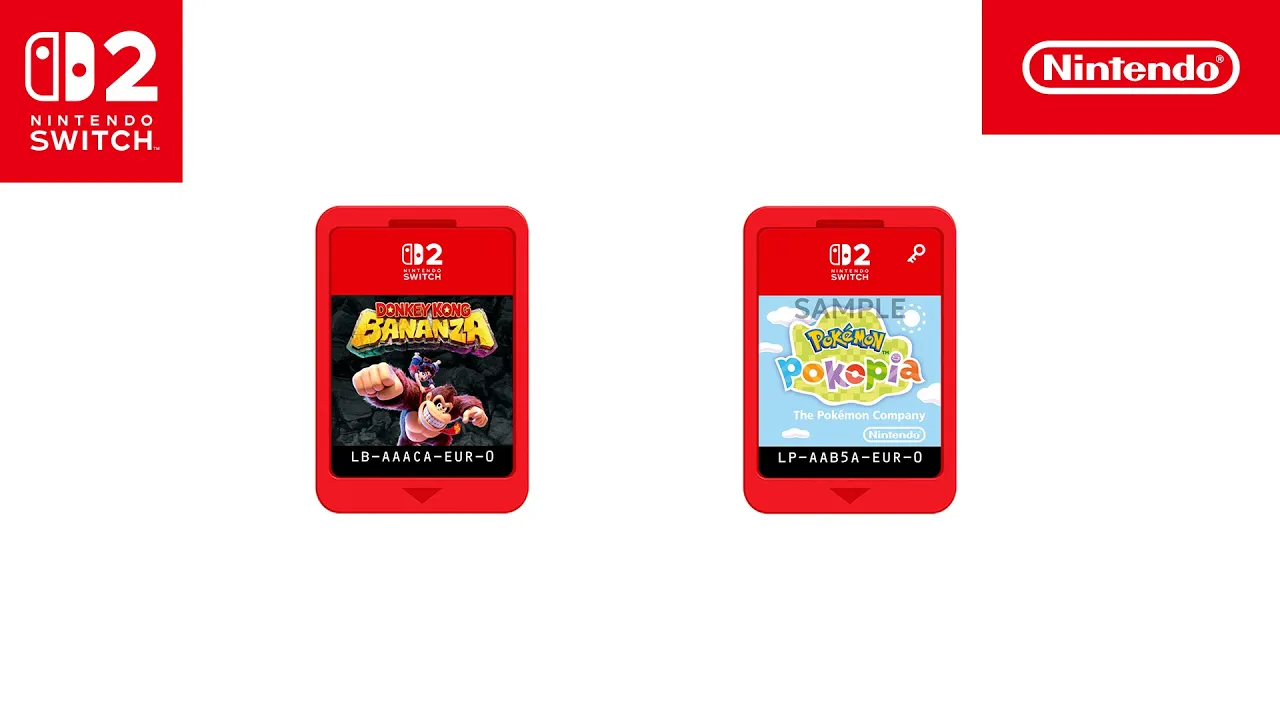
Switch 2 supports two kinds of physical games. A regular game card holds the game data, just like on Switch 1. A game-key card holds no game data and only works as a key for the download. Some games come out on game-key cards, others still on regular cards. The packaging of each game tells you which one you are buying.
For playing, though, the card still behaves like a physical game: it has to be inserted in the console when you start the game. Nintendo explains the whole idea on its game-key card page.
How to play a game from a game-key card
- Insert the card into the console.
- The
HOME Menushows download instructions. - Download the game to the system memory or to a microSD Express card.
- Play with the card still inserted.
Check two things before you start. The console needs system version 20.1.1 or later, otherwise you can’t play from a game-key card. And you don’t need a Nintendo Account just to download the data. Both points are confirmed by Nintendo Support.
When you need the internet
You only need a connection the first time, when the game downloads. After that you can start the game offline, just like from a regular card. The one condition is that the card stays in the console. Take it out and the game won’t start, even with the data downloaded.
If the download or the connection acts up, our overview of Switch 2 error codes covers the most common ones.
How much storage you need
The required space is printed on the packaging, and for the digital version it is also listed in the Nintendo eShop. The data goes either to system memory or to a microSD Express card:
- System memory: Switch 2 has 256 GB, but part of it is reserved for the system.
- microSD Express: you can only expand storage with microSD Express cards, up to 2 TB (after a system update). Regular microSD cards from Switch 1 can’t be used for games.
- Licensed cards: licensed microSD Express cards for Switch 2 are sold by retailers that sell Nintendo games and carry a symbol on the packaging.
If you own several game-key titles, plan your storage ahead. Ports, screen and dock are covered in our Switch 2 specs guide.
Another console and lending
You can put a game-key card into another Switch 2 and play there too. You just download the game data on that console the same way.
A note on Switch 1 and Nintendo Switch 2 Edition games: if you put the card of such a game into a Switch 1, it only launches the Switch 1 version without the Nintendo Switch 2 Edition content.
Regular card vs game-key card vs virtual game card
On Switch 2 you manage digital games through virtual game cards. They work differently from physical cards and from online licences:
| Regular game card | Game-key card | Digital game (virtual game card) | |
|---|---|---|---|
| Game data on the card | yes | no, downloaded | no, downloaded |
| Internet | not needed | first download only | for the download |
| Starting the game | card inserted | card inserted | no physical card |
| Another console | insert the card | insert the card, download the data | load on two paired consoles |
| Lending | hand over the card | hand over the card | to a family group member for 14 days |
Virtual game cards come with a few extra rules. A lent game can be returned before the 14 days are up, DLC goes along with the game, and a Switch 2 game can’t be lent to a Switch 1.
Besides virtual game cards there are online licences. The game then starts without a virtual game card but with an online check. Without a connection it pauses after a while, and the same game can’t be played on several consoles at once.
Game-key cards and specific games
Which kind of card a specific game uses varies from game to game, so we don’t keep a list of game-key titles here. We follow individual releases in our news, for example on the Resident Evil series on Switch 2 or the Witcher 3 cartridge. More titles for the console are in our overview of Switch 2 games.
Join our Discord to ask how other players get on with game-key cards and how much space their games took: GamersTogether Discord.
FAQ
No. The card only holds a key, and you download the full game over the internet to the console or to a microSD Express card.
No. You need it only for the first download. After that the game starts offline, but the card must be inserted in the console.
Yes. Insert it into another Switch 2, download the data and play. You don’t need a Nintendo Account to download the data.
Version 20.1.1 or later. On an older version you can’t play from a game-key card, so update the console first.
No. Switch 2 stores games only in system memory or on microSD Express. Regular microSD cards can’t be used for games.
Information verified on 20 October 2026. More guides to the console are in our Nintendo Switch 2 section.